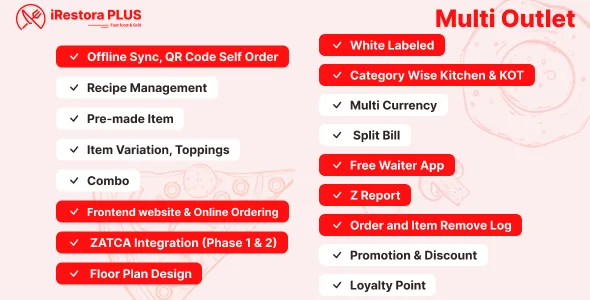
Offline Synchronization
Internet off suddenly? No problem. iRestora PLUS continues working and stores order data locally on the device. When the internet connection returns, the system automatically sends the locally saved order data online again.
How it works: You use the POS → internet goes down → POS continues working → order data is stored locally → internet comes back → data is synchronized online.
Continue taking orders when internet goes down
Continue processing POS orders
Store order data in device memory
Automatic synchronization after reconnection
Full White-Label Support
iRestora PLUS supports white-label customization so businesses and resellers can use their own branding and identity.
Hide selected menu items for resellers
Custom branding for the frontend website
Customizable website colors
Powerful Restaurant POS
iRestora PLUS provides a fast and flexible POS interface for dine-in, takeaway, and delivery orders. It supports both pre-payment and post-payment workflows.
Pre-payment and post-payment
Add new items to running orders
KOT update for only modified or new items
Dine-in, takeaway, and delivery orders
Most-selling items appear first
Fixed and percentage discounts
Instant customer creation
QR Self-Ordering
QR Code Self-Ordering & Contactless Ordering
Let customers order directly from their tables using QR codes, reducing staff workload and improving ordering speed.
Customer scans QR code using a phone
Customer selects food items
Customer places order directly
Cashier accepts or declines the order
Customers can request additional food without waiting for staff
Frontend Website
iRestora PLUS includes a customer-facing restaurant website for online ordering, table reservations, customer accounts, and restaurant information.
Attractive frontend website
Backend-controlled food menu display
Customer registration and login
Online Ordering
Select food and other order details
Customer registration and login
Payment gateway integration
Online Table Reservation
Customers can reserve restaurant tables directly through the frontend website.
Reservation management from the system
Floor Plan & Tables
Realistic Floor Plan & Table Management
Manage dine-in tables visually with a realistic floor plan and real-time table status tracking.
Area-wise table management
Table selection for dine-in
Table selection restrictions for ongoing orders
Kitchen KOT Printing
Category-Wise Kitchen KOT Printing
iRestora PLUS can automatically route kitchen order tickets according to food categories, making it easier to manage multiple kitchen stations.
Category-wise kitchen printers
56mm thermal printer support
80mm thermal printer support
Multiple printer model support
Print bill before closing order
Arabic font printing support
Kitchen Display (KDS)
Kitchen Display System (KDS)
Manage kitchen operations digitally with category-wise kitchen screens and real-time order status updates.
Multiple category-wise kitchens
Order ready notification in POS and waiter panel
Item-wise order status for dine-in
Order-wise status for takeaway and delivery
Kitchen status on active tables
Kitchen performance report
Audio notifications in kitchen and POS
Send only new items to kitchen
Only updated or new items appear after order updates
Running Order Management
Keep orders open while customers continue eating and allow additional items to be added without creating a new order.
Real-time running order list
Add new items to existing orders
Close order only when customer completes eating
KOT print for only newly added items
Menu, Variants, Modifiers
Food Menu, Variants & Item Modifiers
Examples: Small / Medium / Large
Examples: Chocolate / Vanilla / Strawberry
Different recipe for each variant
Different price for each variant
Populate main product information into variants
Toppings and item modifiers
Combo & Deal Management
Automatic stock deduction based on combo items
Recipe & Food Cost
Recipe Management & Food Cost Calculation
Create recipes for food menu items and calculate food costs based on ingredient purchase prices.
Recipe-wise ingredient usage
Average cost based on the latest 3 ingredient purchases
Uses the latest 2 or latest purchase when fewer purchases are available
Uses configured ingredient price when purchase history is unavailable
Recipe-based food cost calculation
Helps determine selling prices
Ingredient Auto Deduction
Ingredient Stock Auto Deduction
Ingredient stock can be automatically deducted based on recipes whenever food items are sold.
Create recipes for food items
Automatically deduct recipe ingredients
Track ingredient consumption
Maintain updated ingredient stock
Smart Stock Management
iRestora PLUS maintains restaurant stock by tracking purchases, sales consumption, toppings, waste, production, transfers, and adjustments.
Sale consumption deduction
Topping consumption deduction
Premade food production deduction
Stock transfer increase/decrease
Stock adjustment increase/decrease
Premade Food & Production
Manage food that is prepared in advance and used later as an ingredient or menu component.
Use premade food in food menus like ingredients
Production module for premade food
Premade food stock management
Double Unit Management
Use different units for purchasing and recipe consumption. For example, salt can be purchased in kilograms and consumed in grams.
Different purchase and recipe units
Automatic stock conversion
Multi-Outlet & Branch Management
Multiple branches and outlets
Branch-wise user assignment
Branch-specific operations
Support for non-kitchen outlets
Transfer prepared food from main branch to non-kitchen outlet
Waiter App
Waiter Management & Free Waiter App
iRestora PLUS includes waiter management features and a free waiter app to speed up order taking and reduce POS congestion.
Note: The free waiter app source code is not included.
Order Status Screen
List of ready orders for pickup
List of in-progress orders
Order status visibility for restaurant staff
Cancel & Audit Log
Order Cancellation & Item Removal Audit Log
Improve accountability and help prevent fraud with detailed order cancellation and item removal logs.
Order cancellation and deletion reports
Require reason for item removal
Service & Delivery Charge
Service & Delivery Charge Management
Percentage-based service charge
Delivery charge configuration
Service and delivery charge reports
Delivery Management
Delivery partner management
Different delivery price from dine-in and takeaway
Different pricing for delivery partners
Multiple customer delivery addresses
Change delivery address while taking an order
Item Pricing Management
Different prices for dine-in
Different prices for takeaway
Different prices for delivery
Outlet-wise different pricing
Different pricing for delivery aggregators
Recipe-based cost calculation to help set selling prices
Invoice & Billing
Multiple payment methods in one sale
Alternative name on invoice
Enable or disable invoice QR code
Table number on invoice and bill
Printing Features
56mm thermal printer support
80mm thermal printer support
Arabic font printing support
Counters & Registers
Multiple Counters & Register Management
Multiple counter facility
Set register opening balance
Automatic register closing balance calculation
Promotions & Loyalty
Promotions & Loyalty Management
Automatic promotion application
Loyalty points for each item
Enable or disable loyalty points
Tax Management
Item-wise different taxes
Customer Management
Customer anniversary date
Default discount for specific customers
Customer Due Management
Customer payment tracking
Supplier Due Management
Supplier payment tracking
Purchase Management
Purchase with supplier management
Purchase with current price
Expense Management
Expense impact on net profit
Waste Tracking
Ingredient-wise waste tracking
Food menu-wise waste tracking
Stock Transfer
Transfer stock between branches
Food transfer between outlets
Support for non-kitchen outlets
Stock Adjustment
When physical stock does not match software stock, administrators can adjust inventory manually.
Stock addition adjustment
Stock subtraction adjustment
Employees & Attendance
Employee Management & Attendance
BI Dashboard
Business Intelligence Dashboard
Get quick insights into restaurant performance through an analytical dashboard.
Today performance insights
Date-range performance insights
Dine-in, takeaway, and delivery comparison
Monthly sales comparison chart
Item Analysis
Item Analysis & Restaurant Analytics
Top profit-generating items
Top revenue-generating items
Food menu performance analysis
Kitchen performance analysis
Z Report
The Z Report provides a detailed summary of restaurant sales, payments, taxes, purchases, expenses, and register activity.
Payment-method-wise breakdown
Payment in other currencies
Reports Included
iRestora PLUS includes a comprehensive collection of reports to help restaurant owners understand sales, inventory, kitchen performance, customers, suppliers, expenses, and profitability.
Kitchen Performance Report
SMS & Communication
SMS & Customer Communication
Payment & Currency
Payment & Currency Management
Payment gateway integration
Accept payment in any currency
Enable or disable multi-currency
Currency totals in Z Report and Register Report
Comma, dot, or space currency separators
Currency position before or after amount
Indonesian currency format
ZATCA Integration
iRestora PLUS includes ZATCA integration for businesses that require Saudi Arabia e-invoicing support.
Saudi Arabia invoice support
Hardware & Integrations
Integration & Hardware Support
Payment gateway integration
Migration & Bulk Import
iRestora PLUS makes migration easier with bulk upload tools that can automatically detect associated data.
Automatic detection of associated category and unit data
No need to upload associated data separately in supported imports
Multilingual Support
Easy to add new languages
Easy language string management
Progressive Web App
iRestora PLUS supports Progressive Web App functionality, helping restaurant teams access the system through a modern web application experience.
Progressive Web App support
Responsive restaurant POS
Tablet-friendly interface
Mobile-friendly interface
Security & Access Control
Branch-wise user assignment
Miscellaneous Features
Food menu barcode generation
Latest Version
Latest Version & Update
Current Version: v7.9
Release Date: 13 August 2026
The latest version includes ZATCA integration and continues the evolution of iRestora PLUS as a modern multi-outlet restaurant POS and management solution.
Technology Stack
Frontend: Bootstrap, jQuery
CSS Framework: Bootstrap, Tailwind CSS
Database: MySQL 8 / MariaDB 8+